📐 架构总览
CGA.js 引擎是一个分层架构的 CGA 规则解析与三维生成系统,核心流程为:源代码 → 解析 → AST → 求值 → 几何生成。
技术栈
| 层级 | 技术 | 说明 |
|---|---|---|
| Parser | ANTLR4 + TypeScript | LL(*) 解析器,自动生成 Lexer/Parser/Visitor |
| AST | TypeScript Interfaces | 强类型抽象语法树 |
| Evaluator | TypeScript | 递归下降求值 + 函数注册表 |
| Geometry | Three.js (BufferGeometry) | 3D 网格生成与变换 |
| Build | Vite | ESM/CJS 双格式输出 |
🗺️ 完整系统架构图
CGA.js 引擎不是孤立的解析器,它与 IDE、函数库、NL2CGA、Marketplace、DCC 插件等子站点一起构成完整工作流:
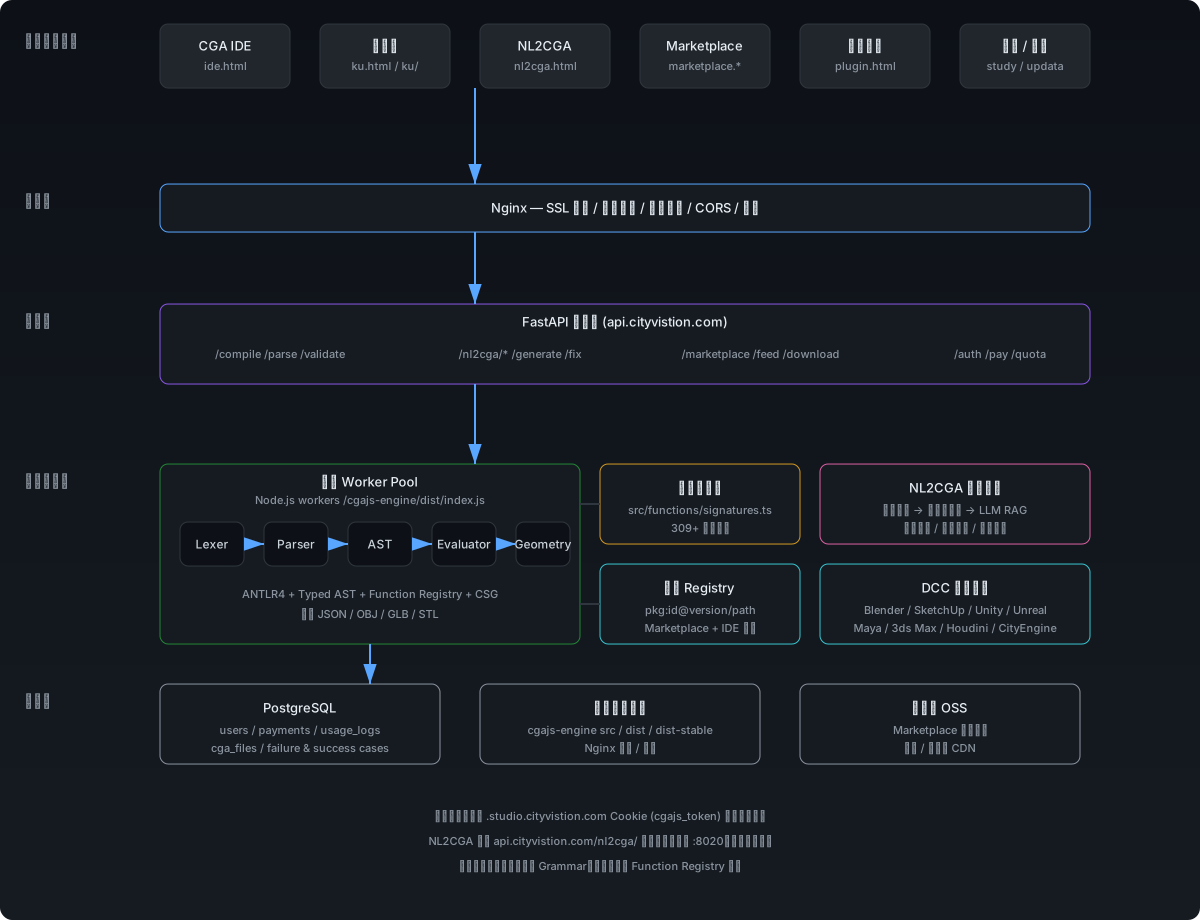
- IDE(ide.html / IDEA / IDEB / IDEC):编辑器、实时预览、代码补全、Marketplace 联动;通过
api.cgajs.cityvistion.com/compile调用引擎。 - 函数库(ku.html):309+ 函数/操作的签名与实现状态;与 IDE 共享
cga-autocomplete.js数据源。 - NL2CGA(nl2cga.html / api.cgajs.cityvistion.com/nl2cga/):自然语言生成 CGA 规则,通过本地 :8020 服务经 Nginx 反向代理接入,失败用例回流知识库。
- Marketplace(marketplace.cityvistion.com / plugin.html):CGA 模块 registry 与 DCC 插件生态;支持
pkg:id@version/path版本化 import。 - 文档 / 学习(study.html / updata.html / docs/*):架构、更新日志、开发指南、能力评估报告。
⚙️ 解析管线(Pipeline)
从 CGA 源码到三维模型的完整处理流程:
预处理(Preprocess)
normalizeBareStochasticBranches() + preprocessCityEngineSyntax()
处理缩进式随机分支、CityEngine 扩展语法转换
词法分析(Lexical Analysis)
CharStreams → CGAGrammarLexer → CommonTokenStream
将源码转换为 Token 序列(IDENT、FLOAT、STRING、关键字等)
语法分析(Syntax Analysis)
CGAGrammarParser → parse tree
ANTLR4 根据 Grammar 规则生成解析树,同时收集 Ambiguity 警告
AST 构建(AST Building)
ASTBuilder (Visitor) → CGAScript AST
遍历解析树,构建类型化的抽象语法树
求值执行(Evaluation)
evaluate() → Shape[]
递归求值 AST,调用几何函数,生成三维 Shape 树
序列化输出(Serialization)
Shape → JSON / OBJ / GLB / STL
将几何数据导出为前端可渲染的格式
🏗️ 分层设计
🟦 Parser 层 — 语法解析
负责将 CGA 源码转换为结构化 AST。核心文件包括 Grammar 定义、ANTLR 生成器和 AST Builder。
🟩 Evaluator 层 — 规则求值
遍历 AST,执行 operation 链,管理递归深度、变量作用域和随机种子。通过函数注册表分派到具体实现。
🟪 Geometry 层 — 三维计算
纯函数集合,接收 Shape 输入,返回变换后的 Shape。包括基本体创建、布尔运算、UV 投影、屋顶生成等。
🔍 Parser 层详解
Grammar 结构
Grammar 采用 ANTLR4 格式,核心规则包括:
script— 入口:version、import、attr、const、func、style、rule 的集合ruleDef— 规则定义:ident(params)? --> ruleBodyruleBody— 规则体:operationChain / conditional / stochastic / assignmentoperation— 操作:simple / comp / split / pushPop / block / tempShapeexpression— 表达式:算术、关系、逻辑、成员访问、数组、条件表达式
关键设计:通用 Block 解析
blockOperation 是一个 catch-all 规则,匹配所有 ident(args){body} 形式的代码。
这意味着 setback、offset、inline 以及未来的新 block 函数,都不需要修改 Grammar。
// Grammar 中的 blockOperation(通用规则)
blockOperation
    : ident ('(' argList? ')')? blockBody (operationSuffix? blockBody)*
    ;

// 以下都被解析为同一个 BlockOperation AST 节点:
setback(1) { front: A | back: B }
offset(1) { inside: A | border: B }
inline("recompose") { A } { B }
myNewFunc(10) { body }  // ← 未来新函数,自动兼容
Parser 回归测试
216 个测试覆盖所有 operation 类型、表达式类型和边缘 case。任何 Grammar 修改都必须通过这些测试。
| 测试组 | 数量 | 覆盖 |
|---|---|---|
| Basic Structures | 11 | 空文件、多规则、声明、注解、注释 |
| Simple Operations | 60+ | 所有内置函数解析 |
| Block / Comp / Split | 35 | 块操作、组件选择、分割轴 |
| Expressions | 40 | 运算符、数组、索引、成员访问 |
| Complex Nesting | 8 | 多层嵌套链 |
| Edge / Error Cases | 17 | 边界值、错误检测 |
🧮 Evaluator 层详解
求值上下文(EvalContext)
每个编译请求创建一个独立的求值上下文,包含:
script— 完整的 CGAScript ASTglobals— 全局变量(attr、const)userFuncs— 用户自定义函数currentDepth / maxDepth— 递归深度控制(防死循环)traceLog— 执行追踪日志(调试用)
Operation 分派
Evaluator 根据 AST 节点类型分派到对应处理器:
evalOperation(op, shape, ctx)
  ├─ SimpleOperation → evalSimpleOperation(name, args, shape, ctx)
  ├─ CompOperation   → evalCompOperation(selector, branches, shape, ctx)
  ├─ SplitOperation  → evalSplitOperation(axis, branches, shape, ctx)
  ├─ PushPopOperation→ evalRuleBody(body, shape, ctx)
  ├─ BlockOperation  → evalBlockOperation(op, shape, ctx)
  └─ TempShapeOperation → evalRuleBody(body, shape, ctx)
📐 Geometry 层详解
Geometry 层是纯函数集合,按功能分为多个目录:
| 目录 | 函数 | 说明 |
|---|---|---|
create/ | extrude, roof*, primitive*, insert, scatter, taper | 创建新几何体 |
split/ | comp, setback, offset, splitArea, innerRectangle, shapeL/U/O | 面/边分割与退缩 |
transform/ | alignScope*, mirrorScope, rotateScope, setPivot | 坐标系变换 |
material/ | color, texture, setupProjection, projectUV, *UV | 材质与 UV |
boolean/ | union, subtract, intersect | 布尔运算 |
manipulate/ | cleanupGeometry, deleteHoles, softenNormals, rectify | 几何清理 |
scope/ | t, s, r, center, mirror | Scope 变换 |
📋 函数注册表(Function Registry)
为了避免 evaluator.ts 成为"千行怪兽文件",引擎引入了函数注册表机制。
注册 API
// src/runtime/evaluator.ts
export function registerSimpleFunction(
  name: string,
  handler: (shape, argVals, ctx) => Shape[]
);

export function registerBlockFunction(
  name: string,
  handler: (op, shape, argVals, ctx) => Shape[]
);
工作原理
现有内置函数注册位置
目前内置函数仍在 evaluator.ts 的 switch-case 中,但注册表优先于 switch-case。未来新函数建议通过注册表添加。
➕ 添加新函数指南
场景 A:普通函数调用 myFunc(args)
- 实现几何逻辑
// src/geometry/operations/create/my-func.ts export function myFunc(shape: Shape, height: number): Shape { // 纯函数:输入 Shape,返回新 Shape return newShape; } - 注册到引擎
import { registerSimpleFunction } from '../runtime/evaluator.js'; import { myFunc } from '../geometry/operations/create/my-func.js'; registerSimpleFunction('myFunc', (shape, args, ctx) => { return [myFunc(shape, args[0] as number)]; }); - 添加测试
// tests/parser/operations.test.ts
{ name: 'myFunc', code: 'Lot --> myFunc(10)' }

// tests/functions/my-func.test.ts
// 验证执行结果
场景 B:Block 形式函数 myFunc(args){body}
- 实现几何逻辑(同上)
- 注册 Block Handler
import { registerBlockFunction } from '../runtime/evaluator.js'; registerBlockFunction('myFunc', (op, shape, argVals, ctx) => { // op.bodies: RuleBody[] — block 内的规则体 const result = myFuncGeometry(shape, argVals[0] as number); if (op.bodies.length > 0) { return evalRuleBody(op.bodies[0], result, ctx); } return [result]; }); - 添加测试(同上)
myFunc(args) 解析为 SimpleOperation,将 myFunc(args){body} 解析为 BlockOperation。
📜 Grammar 修改指南
什么时候改 Grammar?
| 场景 | 是否改 Grammar | 替代方案 |
|---|---|---|
| 增加新函数 | 不改 | 函数注册表 |
| Block 形式新函数 | 不改 | BlockOperation 通用解析 + 注册表 |
| 修复语法 bug | 可以改 | 必须跑完全量回归测试 |
| 全新语法结构 | 谨慎评估 | 先考虑 AST 变换层或预处理 |
修改 Grammar 的强制流程
- 备份 —
cp -r dist/ dist-backup-xxx/ - 修改 —
grammar/CGAGrammar.g4 - 重新生成 —
npm run generate-parser - 更新 AST Builder —
src/parser/ast/types.ts+src/parser/visitors/ast-builder.ts - 运行回归测试 —
npm test(216+ 测试必须全过) - 检查 Ambiguity — 观察测试输出中的
[Parser Ambiguity]警告 - 运行函数测试 —
npm run test:functions - 构建 —
npm run build - 构建验证 —
npm run build - 生产部署 —
./scripts/deploy.sh prod 1.3.0或 Admin 后台"构建并发布"
为什么尽量不改 Grammar?
- First-Set 冲突 — 新规则与现有规则的开头部分重叠
- Ambiguity — Parser 在多个路径间犹豫,可能导致错误选择
- 全局影响 — ANTLR4 的决策表是全局编译的,局部改动可能影响整体
- Visitor 不兼容 — 新规则需要 ASTBuilder 实现新的 visit 方法
真实案例:splitAndSetbackPerimeter 的教训
尝试在 Grammar 中添加 saspOperation 规则以支持 splitAndSetbackPerimeter 的特殊语法:
saspOperation
    : 'splitAndSetbackPerimeter' '(' expression ')' '{' saspBranch '}' '{' saspRemainder '}'
该规则的 FIRST 集合与 blockOperation 完全重叠,导致 comp、split、setback、offset、inline 等大量函数的解析出错。
正确做法:利用已有的 blockOperation 通用解析,在 Evaluator 层识别函数名并做特殊处理。
🚀 部署架构
生产部署流程
Beta 测试站已下线,当前采用直接构建并发布到生产的单环境策略:
| 环境 | 域名 | 引擎目录 | 前端目录 | 用途 |
|---|---|---|---|---|
| Prod | cgajs.cityvistion.com | /www/wwwroot/cgajs-engine/ | /www/wwwroot/studio.cityvistion.com/ | 正式用户访问 |
API 统一使用生产引擎:
cli = "/www/wwwroot/cgajs-engine/cli-wrapper.cjs"
    cli = "/www/wwwroot/cgajs-engine/cli-wrapper.cjs"
部署流程(前端+引擎同步)
开发 & 本地测试
npm test + npm run test:functions
Beta 构建
Admin 后台"构建 Beta" 或 ./scripts/deploy.sh beta
自动更新 package.json 版本号,约 20-30 秒完成,后台自动轮询检测
本地验证
在本地或测试环境验证 CGA + 前端交互
晋升生产
Admin 后台"发布到生产" 或 ./scripts/deploy.sh prod 1.3.0
自动同步:引擎(dist) + 前端(ide.html, enhance.js, ku.html, ku/)
紧急回滚
如发现问题,Admin 后台一键"紧急回滚"
同时回滚引擎 + 前端文件到发布前状态
不再需要在 beta 和 www 之间手动复制前端文件。
🧪 测试体系
三层测试金字塔
| 层级 | 文件 | 数量 | 目的 |
|---|---|---|---|
| Parser Unit | tests/parser/operations.test.ts | 216 | 验证所有语法构造能被正确解析 |
| Function | tests/functions/*.test.ts | 53 cases | 验证每个函数的几何输出正确 |
| E2E | tests/e2e/*.test.ts | 10+ | 验证完整 CGA 规则链的执行 |
部署脚本中的强制检查
scripts/deploy.sh 在部署前自动运行 Parser 回归测试和函数测试,任何失败都会阻断部署:
Step 1/4: Running parser regression tests... ✅
Step 2/4: Running function tests... ✅
Step 3/4: Building engine... ✅
Step 4/4: Deploying to beta/prod... ✅
📋 标准工作流速查
添加新函数(不改 Grammar)
1. geometry/operations/[category]/my-func.ts    ← 几何实现
2. registerSimpleFunction('myFunc', handler)     ← 注册
3. tests/parser/operations.test.ts              ← Parser 测试
4. tests/functions/ 或 tests/e2e/               ← 功能测试
5. npm test + npm run test:functions            ← 验证
6. npm run build                                 ← 构建引擎
7. ./scripts/deploy.sh prod 1.3.0               ← 直接部署到生产
修复 Parser Bug(需要改 Grammar)
1. 修改 grammar/CGAGrammar.g4
2. npm run generate-parser
3. 更新 src/parser/ast/types.ts
4. 更新 src/parser/visitors/ast-builder.ts
5. npm test(必须 216/216 通过)
6. 检查 Ambiguity 警告
7. npm run test:functions
8. npm run build
9. npm run build
10. ./scripts/deploy.sh prod 1.3.0📊 CGA高频函数速查表 — Top 100
本表基于 CityEngine 官方 CGA 函数库与 marketplace.cityvistion.com 的实际使用统计,整理了建筑规则生成中最常调用的 100+ 个高频函数。点击函数名可跳转至详细文档。
✅ 已实现 ⚠️ 部分实现 ❌ 未实现
1. 几何操作类(Top 30)
| 函数 | 说明 | 常用参数 | 状态 |
|---|---|---|---|
| extrude | 拉伸,最核心操作 | extrude(10) | ✅ |
| split | 分割,建筑立面必备 | split(x) { ~1: A }* | ✅ |
| comp(f) | 面组件分割 | comp(f) { top: Roof } | ✅ |
| comp(e) | 边组件分割 | comp(e) { all: Edge } | ✅ |
| translate | 平移 | t(0,5,0) | ✅ |
| rotate | 旋转 | r(0,90,0) | ✅ |
| scale | 缩放 | s(2,1,2) | ✅ |
| color | 设置颜色 | color("#ff6600") | ✅ |
| primitiveCube | 立方体图元 | primitiveCube() | ✅ |
| texture | 贴图 | texture("wall.jpg") | ✅ |
| roofGable | 人字屋顶 | roofGable(30) | ✅ |
| roofHip | 四坡屋顶 | roofHip(30) | ✅ |
| setback | 退界 | setback(2) | ✅ |
| offset | 偏移 | offset(-0.3) | ✅ |
| mirror | 镜像 | mirrorScope(x) | ✅ |
| center | 居中 | center(xz) | ✅ |
| taper | 锥化 | taper(0.8) | ✅ |
| envelope | 包络 | envelope(0.5, 0.3) | ✅ |
| insert | 插入资产 | insert("door.obj") | ✅ |
| primitiveSphere | 球体图元 | primitiveSphere() | ✅ |
| primitiveCylinder | 圆柱图元 | primitiveCylinder() | ✅ |
| primitiveCone | 圆锥图元 | primitiveCone() | ✅ |
| roofPyramid | 金字塔屋顶 | roofPyramid(30) | ✅ |
| roofShed | 单坡屋顶 | roofShed(15) | ✅ |
| setbackPerEdge | 按边退界 | setbackPerEdge(1) | ⚠️ |
| innerRectangle | 内接矩形 | innerRectangle() | ✅ |
| shapeL | L形分割 | shapeL(2,2) | ✅ |
| shapeU | U形分割 | shapeU(2,2) | ✅ |
| convexify | 凸化 | convexify() | ✅ |
| deleteHoles | 删除孔洞 | deleteHoles() | ✅ |
// 典型用法:建筑主体 → 立面分割 → 屋顶
Lot -->
  extrude(rand(10,20))
  comp(f) { top: Roof | side: Facade }

Facade -->
  split(y) { ~1: Floor }*

Roof -->
  roofGable(30)
  texture("roof.jpg")
2. 变换与Scope类(Top 15)
| 函数 | 说明 | 常用参数 | 状态 |
|---|---|---|---|
| alignScopeToAxes | 对齐坐标轴 | alignScopeToAxes(y) | ✅ |
| alignScopeToGeometry | 对齐几何体 | alignScopeToGeometry(zUp,0) | ✅ |
| setPivot | 设置枢轴点 | setPivot(xyz,0,0,0) | ✅ |
| rotateScope | 旋转作用域 | rotateScope(0,45,0) | ✅ |
| mirrorScope | 镜像作用域 | mirrorScope(x) | ✅ |
| scope.sx | 作用域X尺寸 | scope.sx | ✅ |
| scope.sy | 作用域Y尺寸 | scope.sy | ✅ |
| scope.sz | 作用域Z尺寸 | scope.sz | ✅ |
| scope.tx | 作用域X位置 | scope.tx | ✅ |
| scope.ty | 作用域Y位置 | scope.ty | ✅ |
| scope.tz | 作用域Z位置 | scope.tz | ✅ |
// 基于Scope的自适应缩放
Adaptive -->
  alignScopeToAxes(y)
  s(scope.sx * 0.9, scope.sy, scope.sz * 0.9)
  center(xz)
3. 材质与UV类(Top 10)
| 函数 | 说明 | 常用参数 | 状态 |
|---|---|---|---|
| setMaterial | 设置材质 | setMaterial("glass", color, 0.8) | ✅ |
| resetMaterial | 重置材质 | resetMaterial() | ✅ |
| setupProjection | 设置投影 | setupProjection(0, scope.sx, scope.sy) | ✅ |
| projectUV | 投影UV | projectUV(0) | ✅ |
| tileUV | 平铺UV | tileUV(0, 2, 2) | ✅ |
| rotateUV | 旋转UV | rotateUV(0, 45) | ✅ |
| scaleUV | 缩放UV | scaleUV(0, 2, 1) | ✅ |
// 砖墙材质UV设置
BrickWall -->
  setupProjection(0, scope.sx, scope.sy)
  projectUV(0)
  tileUV(0, scope.sx / 0.5, scope.sy / 0.3)
  texture("brick.jpg")
4. 数学函数类(Top 15)
| 函数 | 说明 | 常用参数 | 状态 |
|---|---|---|---|
| abs | 绝对值 | abs(-5) | ✅ |
| rand | 随机数 | rand(0,1) | ✅ |
| min | 最小值 | min(a, b) | ✅ |
| max | 最大值 | max(a, b, c) | ✅ |
| clamp | 钳制 | clamp(val, 0, 10) | ✅ |
| sqrt | 平方根 | sqrt(16) | ✅ |
| pow | 幂运算 | pow(2, 3) | ✅ |
| sin | 正弦 | sin(30) | ✅ |
| cos | 余弦 | cos(45) | ✅ |
| tan | 正切 | tan(60) | ✅ |
| floor | 向下取整 | floor(3.7) | ✅ |
| ceil | 向上取整 | ceil(3.2) | ✅ |
| round | 四舍五入 | round(3.5) | ✅ |
| log | 自然对数 | log(100) | ✅ |
| exp | 指数 | exp(1) | ✅ |
// 随机楼层高度
FloorHeight -->
  floor(rand(3.0, 4.5) * 10) / 10
5. 字符串与列表类(Top 10)
| 函数 | 说明 | 常用参数 | 状态 |
|---|---|---|---|
| strlen | 字符串长度 | strlen("hello") | ✅ |
| search | 搜索子串 | find("abc", "b") | ✅ |
| replace | 替换子串 | replace("a,b", ",", ";") | ✅ |
| split | 字符串分割 | splitString("a;b;c", ";") | ✅ |
| listSize | 列表大小 | listSize("a;b;") | ✅ |
| listAdd | 列表添加 | listAdd("a;b;", "c") | ✅ |
| listRandom | 随机选择 | listRandom("red;blue;green;") | ✅ |
| listItem | 获取列表项 | listItem("a;b;c;", 1) | ✅ |
| append | 追加元素 | append([1,2], 3) | ✅ |
| reverse | 反转数组 | reverse([1,2,3]) | ✅ |
// 从列表随机选材质
PickMaterial -->
  listRandom("brick.jpg;concrete.jpg;wood.jpg;")
  texture(listRandom("brick.jpg;concrete.jpg;wood.jpg;"))
6. 几何查询类(Top 15)
| 函数 | 说明 | 常用参数 | 状态 |
|---|---|---|---|
| geometry.area | 面积 | geometry.area | ✅ |
| geometry.height | 高度 | geometry.height | ✅ |
| geometry.volume | 体积 | geometry.volume | ✅ |
| geometry.nFaces | 面数 | geometry.nFaces | ✅ |
| geometry.nVertices | 顶点数 | geometry.nVertices | ✅ |
| geometry.isPlanar | 是否平面 | geometry.isPlanar | ✅ |
| geometry.isClosedSurface | 是否封闭 | geometry.isClosedSurface | ✅ |
| geometry.boundaryLength | 边界长度 | geometry.boundaryLength | ✅ |
| geometry.angle | 角度 | geometry.angle | ⚠️ |
| geometry.bbArea | 包围盒面积 | geometry.bbArea | ❌ |
| geometry.height | 顶部Y坐标 | geometry.top | ❌ |
| geometry.bottom | 底部Y坐标 | geometry.bottom | ❌ |
// 按面积自适应细节
Detail -->
  case geometry.area > 50 : HighDetail
  else : LowDetail
7. 资产与文件类(Top 10)
| 函数 | 说明 | 常用参数 | 状态 |
|---|---|---|---|
| assetInfo | 资产信息 | assetInfo("tree.obj", "sx") | ✅ |
| assetFitSize | 资产适配尺寸 | assetFitSize(assets, scope.sx) | ✅ |
| assetApproxRatio | 资产近似比例 | assetApproxRatio(assets) | ✅ |
| fileSearch | 文件搜索 | fileSearch("*.jpg") | ✅ |
| fileExists | 文件存在检查 | fileExists("data.txt") | ✅ |
| fileBasename | 文件基名 | fileBasename("a/b.jpg") | ✅ |
// 动态加载适配窗户
Window -->
  insert(assetFitSize(assets, scope.sx * 0.8))
8. 布尔与高级操作类(Top 8)
| 函数 | 说明 | 常用参数 | 状态 |
|---|---|---|---|
| union | 并集 | union { A | B } | ✅ |
| subtract | 差集 | subtract { A | B } | ✅ |
| intersect | 交集 | intersect { A | B } | ✅ |
| scatter | 散布 | scatter(surface, 20) | ✅ |
| repeat | 重复 | split(x) { ~1: A }* | ⚠️ |
| copy | 复制 | copy(5) | ❌ |
| instance | 实例化 | instance("ref") | ❌ |
| label | 标签 | label("facade") | ✅ |
| setTagsFromEdgeAttrs | 从边属性设置标签 | setTagsFromEdgeAttrs("usage") | ✅ |
| tag | 设置标签 | setTag("window") | ❌ |
| deleteTags | 删除标签 | deleteTags() | ✅ |
// 散布树木到地面
Ground -->
  scatter(surface, 50)
  insert("tree.obj")
9. 颜色与转换类(Top 3)
| 函数 | 说明 | 常用参数 | 状态 |
|---|---|---|---|
| colorRamp | 颜色渐变 | colorRamp("height", 0.5) | ✅ |
| rgb | RGB颜色 | rgb(1,0.5,0) | ❌ |
| hsb | HSB颜色 | hsb(120,0.8,0.9) | ❌ |
// 高度驱动的颜色渐变
ColorByHeight -->
color(colorRamp("height", geometry.height / 50))translate ↔ t、log ↔ ln、round ↔ rint),引擎内部均已支持。⚠️ 标记的函数为简化实现或仅特定上下文可用。
📊 CGA.js 能力评估与增强路线图
本报告基于 CityEngine 2025.1 官方 CGA Reference 对 CGA.js 引擎进行系统评估,明确当前解析/求值能力、与官方的差距、以及可作为差异化竞争力的独特能力。
评估结论速览
| 维度 | 结论 |
|---|---|
| 语法解析能力 | 强 官方绝大多数 operation / function 语法均可解析;函数审计 82 项中 0 项解析失败。 |
| Operation 覆盖 | ~70% 76 个官方 operation 中约 33 个完整实现,41 个简化实现。 |
| Built-in 函数覆盖 | ~62% 110 个官方函数中约 47 个完整实现,32 个简化实现。 |
| 布尔运算 | 已接入 three-bvh-csg,支持 union/subtract/intersect、标签保留与非流形 fallback。 |
| 模块与数据 | 已支持 JSON 数据绑定 import、远程/版本化 pkg: import。 |
| LOD 控制 | 已支持 @LOD(min, max) 按 GenerateOptions.lod 过滤规则。 |
| 独特优势 | 显著 Web IDE、URL 共享、Marketplace、NL2CGA、确定性种子、REST API、插件化。 |
1. 与 CityEngine 2025.1 的覆盖对比
估算方式:coverage = (fully + 0.5 × partial) / total。
| 类别 | 官方数 | ✅ 完整 | ⚠️ 简化 | ❌ 缺失 | 🚫 困难 | 估算覆盖 |
|---|---|---|---|---|---|---|
| Geometry creation | 17 | 12 | 5 | 0 | 0 | ~85% |
| Geometry subdivision | 11 | 0 | 11 | 0 | 0 | ~50% |
| Geometry manipulation | 11 | 1 | 10 | 0 | 0 | ~55% |
| Geometry tagging | 3 | 2 | 0 | 1 | 0 | ~66% |
| Rule inlining / Boolean 3D | 4 | 3 | 1 | 0 | 0 | ~87% |
| Texturing / UVs | 10 | 6 | 4 | 0 | 0 | ~80% |
| Transformations | 6 | 3 | 3 | 0 | 0 | ~75% |
| Scope operations | 6 | 1 | 5 | 0 | 0 | ~55% |
| Flow control | 3 | 2 | 1 | 0 | 0 | ~85% |
| Context | 1 | 0 | 0 | 1 | 0 | 0% |
| Attributes / I/O | 4 | 3 | 1 | 0 | 0 | ~90% |
| **Operations subtotal** | **76** | **33** | **41** | **1** | **0** | **~70%** |
| Math functions | 21 | 21 | 0 | 0 | 0 | ~100% |
| Probability functions | 2 | 2 | 0 | 0 | 0 | ~100% |
| Conversion functions | 8 | 8 | 0 | 0 | 0 | ~100% |
| String functions | 5 | 5 | 0 | 0 | 0 | ~100% |
| Geometry metric functions | 26 | 0 | 15 | 9 | 2 | ~40% |
| Material functions | 2 | 0 | 1 | 1 | 0 | ~25% |
| File functions | 6 | 6 | 0 | 0 | 0 | ~100% |
| Asset / image functions | 15 | 0 | 3 | 11 | 1 | ~20% |
| Occlusion functions | 3 | 0 | 3 | 0 | 0 | ~50% |
| Context functions | 3 | 0 | 3 | 0 | 0 | ~50% |
| Array functions | 12 | 5 | 5 | 2 | 0 | ~65% |
| Edge attribute functions | 3 | 0 | 3 | 0 | 0 | ~50% |
| Miscellaneous functions | 4 | 0 | 2 | 1 | 1 | ~30% |
| **Functions subtotal** | **110** | **47** | **32** | **24** | **4** | **~62%** |
| **Overall** | **186** | **80** | **73** | **25** | **4** | **~63%** |
2. 重点函数/特性跟踪(Top 15)
这些函数在真实 CityEngine 规则中使用频率高,且在 web/Three.js 引擎中可实现:
| # | 函数/特性 | 类别 | 重要性 | 可行性 | 状态 |
|---|---|---|---|---|---|
| 1 | comp 数组选择器 | Subdivision / Arrays | 读取面/边数量、长度、面积到数组,使用极广。 | 中 | ✅ 已落地 |
| 2 | split 的 noAdjust 模式与 u/v UV 分割 | Subdivision | 立面 UV 细分及大量 ESRI.lib 规则所需。 | 中 | ✅ 已落地 |
| 3 | label 操作 | Context | 支持带标签的遮挡/上下文查询。 | 易 | ✅ 已落地 |
| 4 | deleteTags 操作 | Tagging | 标签密集型工作流与布尔清理必需。 | 易 | ✅ 已落地 |
| 5 | setTagsFromEdgeAttrs 操作 | Tagging | 把 GIS 边属性桥接到 CGA 选择器。 | 中 | ✅ 已落地 |
| 6 | geometry.angle | Geometry metrics | 用于立面定向与街道侧检测。 | 中 | ❌ 待实现 |
| 7 | geometry.nHoles, uMin/uMax/vMin/vMax, du/dv | Geometry metrics | 立面与屋顶规则常用。 | 易–中 | ❌ 待实现 |
| 8 | geometry.tags | Geometry metrics | 让规则读取每个组件的标签。 | 中 | ❌ 待实现 |
| 9 | readMaterial | Material | 加载 .mtl/.cgamat 到 setMaterial 数组。 | 中 | ❌ 待实现 |
| 10 | assetNamingInfo / assetNamingInfos | Asset | 资产选择辅助链所需。 | 易 | ❌ 待实现 |
| 11 | assetsSortSize / assetsSortRatio / imageBestRatio / imageApproxRatio | Asset / Image | 程序化资产放置核心。 | 中 | ❌ 待实现 |
| 12 | fileRandom | File utility | 从工作区随机选择资产。 | 易 | ❌ 待实现 |
| 13 | extrude(world.up.flatTop / face.normal / vertex.normal) | Geometry creation | 现代 CityEngine 默认拉伸模式。 | 中 | ❌ 待实现 |
| 14 | convert(完整坐标系转换) | Misc | scope/world/object/pivot 转换。 | 中 | ❌ 待实现 |
| 15 | setupProjection 额外轴与投影模式 | Texturing | 正确立面 UV 设置所需。 | 中 | ❌ 待实现 |
3. 不建议在浏览器引擎中实现的能力
以下能力需要重型 GIS、CAD 解析或精确浮点语义,超出当前引擎定位:
| 能力 | 原因 |
|---|---|
| 完整几何遮挡树(inside/overlaps/touches 任意网格) | 需要 CPU BVH / 空间索引与逐三角形测试,浏览器实时生成太重。 |
| 原生 CAD/资产导入(DWG / FBX / USD / IFC / glTF 浏览器端加载) | 文件解析与纹理管线很大,适合服务端或预转换资产。 |
| getGeoCoord | 需要地理参考、坐标系转换与 GIS 元数据。 |
| 完全复刻 CityEngine 浮点语义 | CityEngine 使用双精度与专有清理,像素级一致不现实。 |
4. CGA.js 独有的竞争力
相比 CityEngine 桌面版,本引擎原生具备以下差异化能力:
| 能力 | 说明 |
|---|---|
| 零安装 Web IDE | 浏览器直接编辑、预览、诊断,无需安装 ArcGIS/CityEngine。 |
| URL / Marketplace 规则共享 | ?cga_id= 自动加载规则;支持发布、售卖、版本管理。 |
| NL2CGA AI 助手 | 自然语言生成、解释、自动修复 CGA 规则。 |
| REST API / SaaS | 通过 API 编译规则,支持批量城市生成。 |
| 运行时插件注册表 | registerSimpleFunction / registerBlockFunction / loadPlugin 热插拔。 |
| 确定性种子 | seed 控制随机分支,可复现、可缓存。 |
| 逐操作 Trace Log | 性能分析 JSON,包含 inputVertices / durationMs 等。 |
| 多格式导出 | GLB / OBJ / JSON / STL,且可通过 registerEncoder 扩展。 |
| JSON 初始形状 | 任意 web JSON / GeoJSON 数据直接驱动生成。 |
| AI 自学习系统 | admin 后台收集失败样例并自动推荐修复。 |
| 函数回归矩阵 | admin 函数测试中心,实时查看覆盖与通过率。 |
5. 布尔 CSG 方案:three-bvh-csg(已接入)
已正式接入 three-bvh-csg 替换原有的 bbox 近似布尔运算:
- 实现位置:
src/geometry/operations/boolean/csg.ts。 - 库版本:three@0.164.1 + three-bvh-csg@0.0.17 + three-mesh-bvh@0.7.8。
- API:
Evaluator.evaluate(brushA, brushB, ADDITION | SUBTRACTION | INTERSECTION)。 - 标签保留:通过
geometry.groups记录 bool.A / bool.B 来源,结果 re-index 后恢复label:*标签,供后续comp(f)选择。 - 非流形 fallback:CSG 抛异常时自动回退到原 bbox 裁剪逻辑,保证复杂输入不崩溃。
6. 解析器增强路线图
以下 5 项可在现有 ANTLR Grammar + Evaluator 架构上增量实现,使引擎在 web 场景下超越 CityEngine:
| 特性 | 说明 | 状态 |
|---|---|---|
| JSON 数据绑定 import | import "data.json" as data / import data: "data.json";把 web API 数据直接绑定到属性。 | ✅ 已落地 |
| 远程/版本化模块 import | import "pkg:42@v1.2" as facade; marketplace 升级为模块仓库,支持相对/baseUrl 解析。 | ✅ 已落地 |
| 确定性 seed 注解 | @Seed(12345) / seed(42);分支级可复现随机。 | 部分 |
| LOD 注解 | @LOD(min, max) 按 GenerateOptions.lod 过滤规则。 | ✅ 已落地 |
| 内联 asset/material 声明 | material brick = { ... } 支持 PBR 纹理包。 | 待定 |
7. 已落地实施清单
- 接入 three-bvh-csg:替换简化布尔,支持真正的 union/subtract/intersect 并保留标签。
- 补齐 Top 5 缺失函数:comp 数组选择器、split noAdjust/u-v、label、deleteTags、setTagsFromEdgeAttrs。
- JSON 数据绑定 import:web API 数据可直接绑定到 CGA 属性。
- 远程/版本化 import:
pkg:URL 让 marketplace 具备模块仓库能力。 - LOD 注解:
@LOD(min, max)按当前 LOD 过滤规则,支撑大规模场景简化生成。
8. 近期已落地能力(v1.3.x)
最近一次迭代完成了 5 项核心增强,显著缩小了与 CityEngine 的几何与工程能力差距:
| 特性 | 实现要点 | 验证 |
|---|---|---|
| three-bvh-csg 布尔 | union/subtract/intersect 使用真实 CSG;结果 re-index;通过 geometry.groups 保留 bool.A / bool.B 标签;失败回退 bbox 近似。 | 测试通过 |
| Top 5 高频函数 | comp 数组选择器([front, back])、split noAdjust 与 UV 空间 split(u/v)、label、deleteTags、setTagsFromEdgeAttrs。 | 测试通过 |
| JSON 数据绑定 import | import "x.json" as data 或 import data: "x.json";解析后注入初始 shape 属性。 | 测试通过 |
| 远程/版本化 import | pkg:module@version 解析到 registry URL;递归加载模块规则;支持 alias 命名空间。 | 测试通过 |
| LOD 注解 | @LOD(min, max) / @LOD(min);按 GenerateOptions.lod 跳过不匹配规则。 | 测试通过 |